
 Phantom
Sidekick is a macro utility that executes Phantom scripts
or other applications on command. It accomplishes this by
waiting quietly in the background for key combinations,
or 'triggers' to be detected, and then executes a Phantom
script that corresponds to that trigger.
Phantom
Sidekick is a macro utility that executes Phantom scripts
or other applications on command. It accomplishes this by
waiting quietly in the background for key combinations,
or 'triggers' to be detected, and then executes a Phantom
script that corresponds to that trigger.
This powerful tool can be used to
automate an endless variety of tasks. Its functionality
is largely based upon the Phantom language which interacts
with Windows Graphical User Interfaces (GUIs). Scripts can
be written using the Phantom language, or recorded using
the recorder utility, and then played back on command.
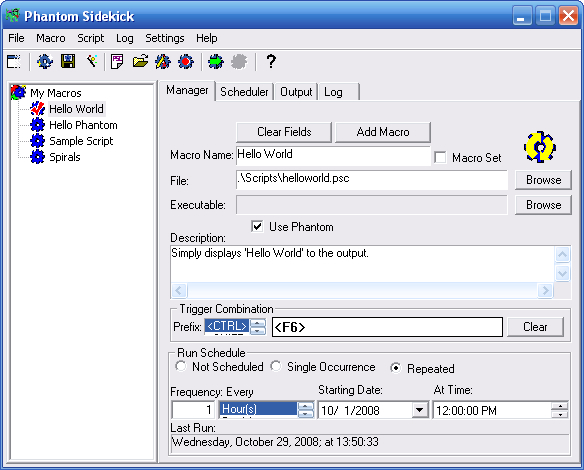
The Macro Manager utility gives full
control of the macro creation process. Using this utility,
existing or newly recorded scripts can be assigned to a
trigger to create a macro or scheduled for execution.
Macros can be run on a pre-determined
schedule using the built-in Macro Schedule. Schedule macros
to run at a specific time or over a specified interval.
Additionally, Sidekick includes a Macro Wizard for common
macro tasks.
Version 2.1 of Phantom Sidekick supports
the Phantom 2.0 language interpreter.
Click
for larger image
What are macros?
Macros are a set of instructions or actions that can be
performed using a simple command, such as a keystroke or
a mouse click. When the command, or 'trigger' occurs, the
set of instructions executes automatically. Basically, macros
are there to make your life easier. Phantom Sidekick macros
are designed to make your life with the Windows operating
system easier. For example, Sidekick can log on to e-mail
and retirieve messages at the click of a button, or prepare
a commonly used spreadsheet chart at a keystroke. Sidekick
macros can range from simple, repetative tasks (checking
e-mail) to complex tasks that may take hours to complete
manually. You tell Sidekick what to do, and Sidekick will
do it - often times without writing a single line of code.
 So
how does Sidekick do all this?
So
how does Sidekick do all this?
The instructions for a Sidekick macro come from a Phantom
script. This script is executed using the Phantom Interpreter
which interacts with a window. These scripts can be created
manually using the built-in script editor, automatically
by using the Macro Wizard, or by recording actions using
the Recorder utility. The set of instructions is executed
by using the Macro Viewer, via a Macro Trigger, or by using
the Macro Scheduler. The Macro Viewer is a window that displays
all available macros. It can be accessed in the main Sidekick
window, or through the Sidekick icon in the system tray.
Macro Triggers are key combinations that launch the macros,
such as holding down the 'CTRL' and 'F1' keys simultaneously.
Triggers also include prefix keys that are used to activate
macros before the trigger is pressed. The Macro Scheduler
runs macros at specified times or intervals.
Key Features
-
Macro Recorder
-
Macro Wizard
-
Macro Scheduler
-
Execution Log
|
-
Quick View
-
Key Triggers
-
Script Editor
-
Easy Macro Management
|

